A modern, mobile-first extension of your ScheduleMaster account.
Centerline is an independent app that connects to ScheduleMaster with your existing club credentials. No new account, no separate data — just a different interface for reservations, preflights, and postflights, designed around the phone.
A different interface for the same account.
Centerline works alongside ScheduleMaster, not instead of it. When you sign in, Centerline signs in to ScheduleMaster on your behalf and shows you your data from there.
Your reservations, your aircraft catalog, your currency, your squawks, your statement — all of it stays exactly where it lives now. ScheduleMaster remains the system of record. Stop using Centerline tomorrow and nothing changes on your club account.
What Centerline adds is a phone-focused interface for the things pilots do most often on the move — checking the schedule, booking a plane, closing out a flight.
A few things you won’t find anywhere else.
Most of Centerline is a faster, mobile-friendly version of what you already have. The features below are exclusive to Centerline — they don’t exist in ScheduleMaster at all. The two big ones first; three smaller ones in the next section.
Plan a Flight
Tell Centerline when you’re free and how long you want to fly. It searches the fleet for a plane that fits — single day or multi-day.
- Search across the entire fleet at once
- Filter by day-of-week, time window, duration
- Find weekend trips weeks out, in seconds
Rideshare
Find another pilot in the club to share a flight with — for safety pilot duty, building hours, mock checkrides, or just flying with company.
- Book a flight and advertise it as a Rideshare
- Search active flights tagged for rideshare
- Save email alerts and get notified the moment a match shows up
A few more, only here.
Gain access to an ever-growing list of features that exist only in Centerline.
Weather on every booking
Live METAR and TAF on active bookings and the schedule’s airport headers, pulled from aviationweather.gov. A nearest-TAF fallback covers smaller fields that don’t publish their own forecast.
ForeFlight logbook export
After a committed postflight, download a CSV that imports straight into ForeFlight’s logbook. It auto-fills with the right perspective: your flight when you were the pilot, instruction given when you were the CFI.
Fees in the price
Your club’s percentage surcharge (the IDP charge or fund line) folded into the hourly rate on aircraft cards. One toggle, and the price you see is the price you pay.
Heads-up by email
When a plane you’ve booked has a rate change, new squawk, or maintenance issue, we’ll email you. Opt in once; turn off anytime.
Built for the phone in your flight bag.
The night-before-the-flight and on-the-ramp workflows, designed mobile-first.
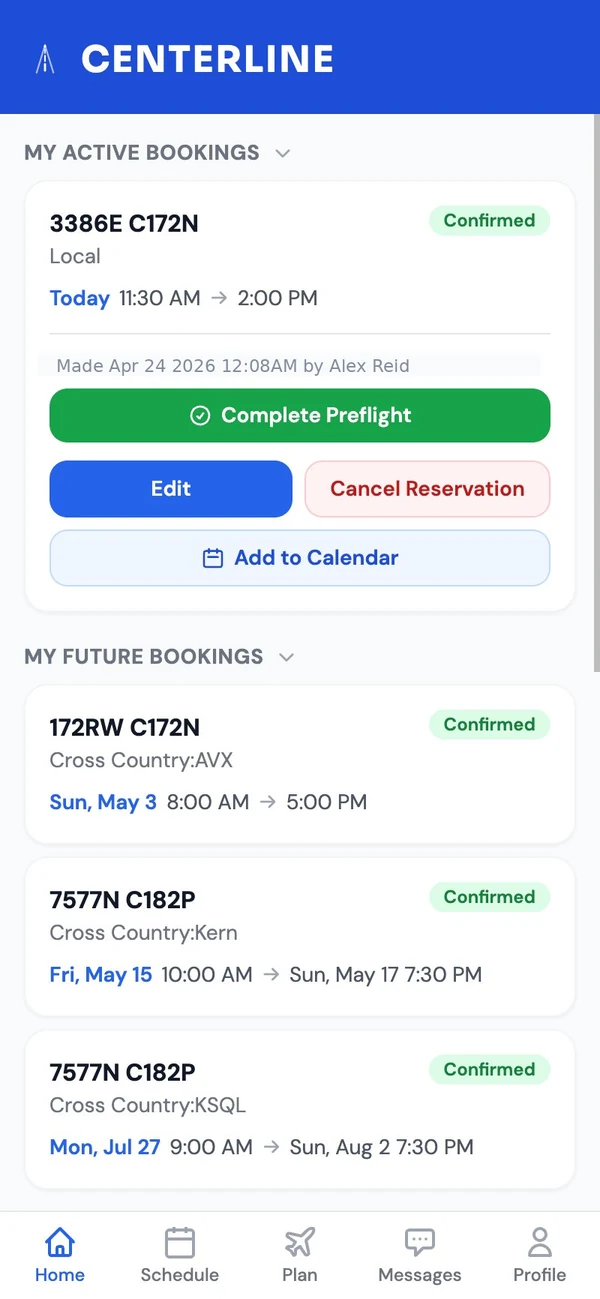
Your reservations at a glance
Upcoming flights, past bookings, and one-tap calendar export — all on one screen when you open the app.
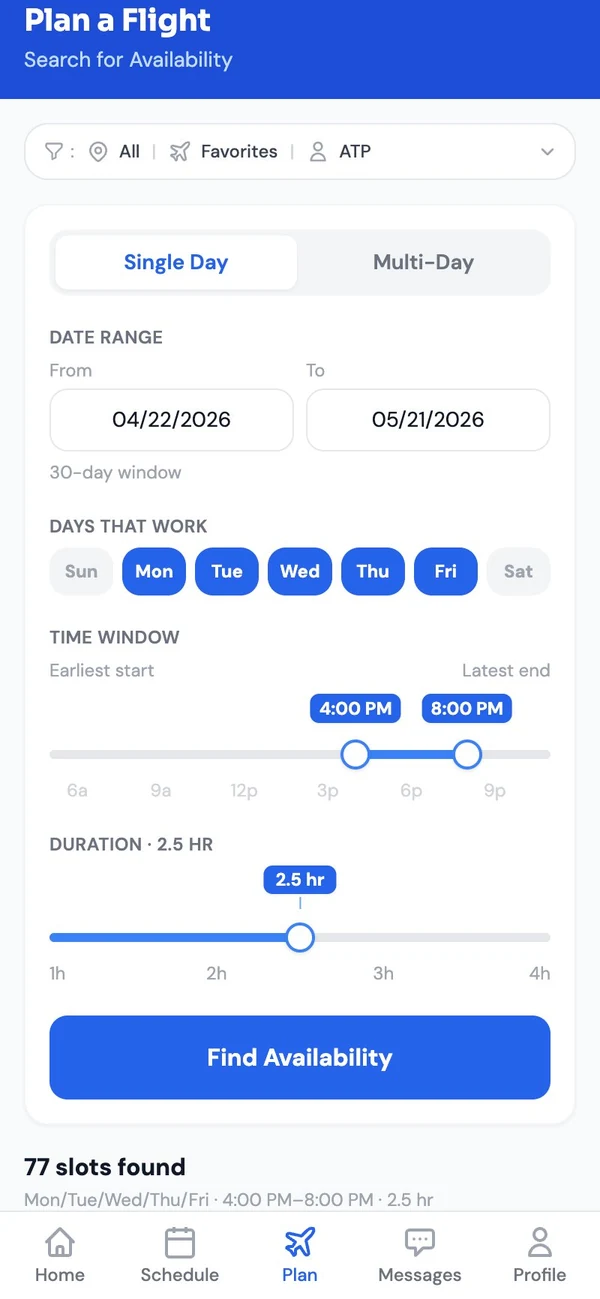
Find a plane that fits your schedule
Tell Centerline when you can fly and for how long. It searches the club's availability across the fleet — single day or multi-day.
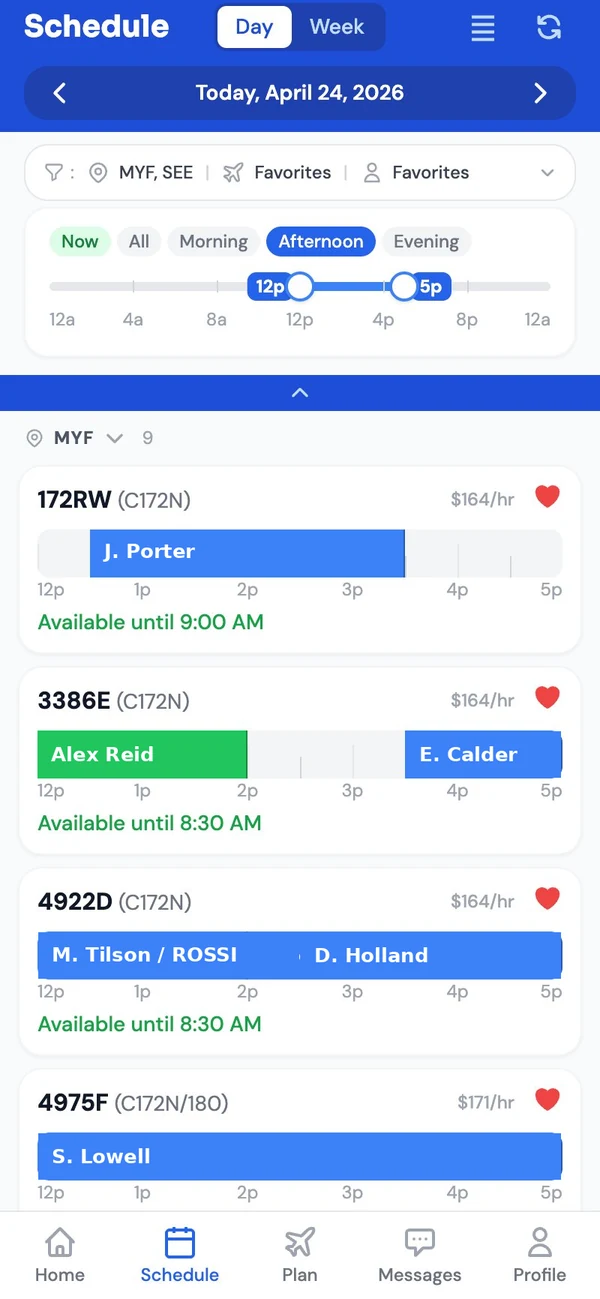
The day at a glance
Every plane at your field in one scrolling list. Favorite the ones you fly, see availability windows at a glance.
Put Centerline on your home screen
Centerline installs like a native app — no App Store required. Tap the icon and it launches full-screen, straight into the schedule.
Not just for the phone.
Centerline works on your laptop too — same app, same sign-in, just more room to see. Follows your device — light or dark, however you've set it.
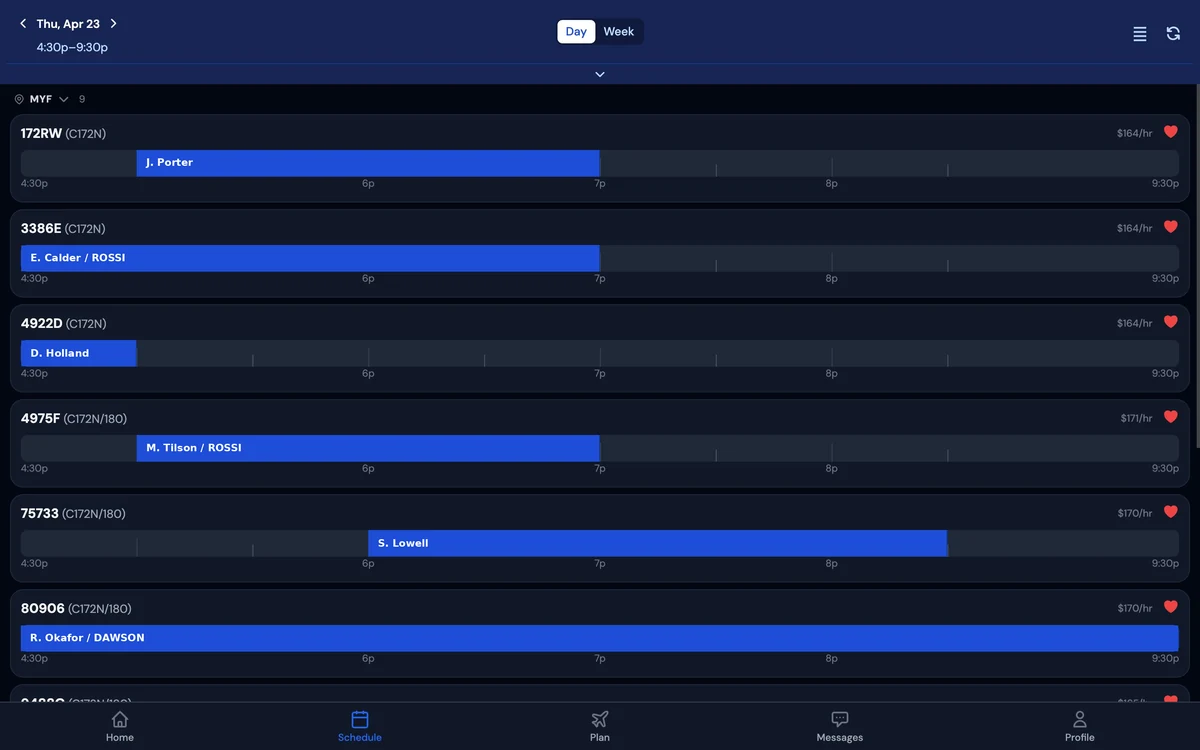
Familiar features in a different interface.
Centerline covers the core club workflow with a mobile-first interface — the everyday stuff, done from your phone.
Fast schedule view
The day's bookings across the fleet, laid out for quick scanning.
Phone-first reservations
Book, edit, or cancel from your phone in a few taps. Conflict detection, standby mode, and lesson bookings.
Preflight + postflight
Currency, hobbs, tach, meter readings — the ramp workflow done from the pilot seat.
No new account
If you're already a club member on ScheduleMaster, you're already a Centerline member. Sign in and you're in.
Plus the Centerline-only features further up.
The question you were going to ask anyway.
Centerline asks for your ScheduleMaster username and password. It's fair to want to know what happens to them before you type them in.
Your password isn't kept
It's used once to sign you in with ScheduleMaster, then forgotten. Centerline never stores it.
Bounded by your own account
Centerline acts through your ScheduleMaster account, so it can never do anything you couldn't already do yourself — no hidden access, no special privileges.
Revoke any time
Sign out and your session ends. Change your ScheduleMaster password and every Centerline session stops working. Or delete your Centerline account entirely from Settings — it removes your Centerline data for good and never touches your ScheduleMaster account.
What's kept
By default, just your name and email (so we can reach out about updates — optional — and ask for feedback), plus your in-app preferences like favorite aircraft and a record of when you sign in. We don't keep a copy of your ScheduleMaster flight history or billing information — that's read live when you need it. A few optional features can store a little more only if you decide to turn them on; the privacy page has the full list.
Honest answers.
Is Centerline affiliated with ScheduleMaster?
No. Centerline is an independent project, not endorsed by or affiliated with ScheduleMaster. It uses your ScheduleMaster credentials, on your behalf, the same way the official ScheduleMaster app does.
Why not use the official ScheduleMaster app?
You should, if it works for you. Centerline started as a personal project — I wanted a different interface for my own use — and a few other pilots have found it useful too. It's an alternative, not a replacement.
What happens if I forget my ScheduleMaster password?
Reset it on ScheduleMaster, not here. Centerline doesn't manage your password — it's a ScheduleMaster credential, full stop. Once you've reset it on ScheduleMaster, sign in to Centerline with the new one.
What does Centerline store about me?
Your name and email, a record of when you log in (so we can see who's actually using the app and follow up about updates), and your in-app preferences like favorite aircraft. We don't keep a copy of your ScheduleMaster flight history or billing — that's read live when you need it. A few optional features can store a little more when you turn them on. You can opt out of emails anytime in your account settings, or by replying to any email from Centerline. See the privacy page for the full list.
Can I break something by using Centerline?
No more than you could by using the ScheduleMaster app itself. Every action Centerline takes — booking, editing, cancelling, preflight, postflight — is the same action you'd take in ScheduleMaster, just through a different interface. The data is the same data.
Who built this?
A small project, built by a pilot for pilots. If something's broken, email contact@oncenterline.app and the person responsible will read it.
Ready to try it?
Sign in with your ScheduleMaster credentials. If you don't like it, sign out — nothing changes on your club account.
Sign in to Centerline